• Send Us a Message
  • Skip to content

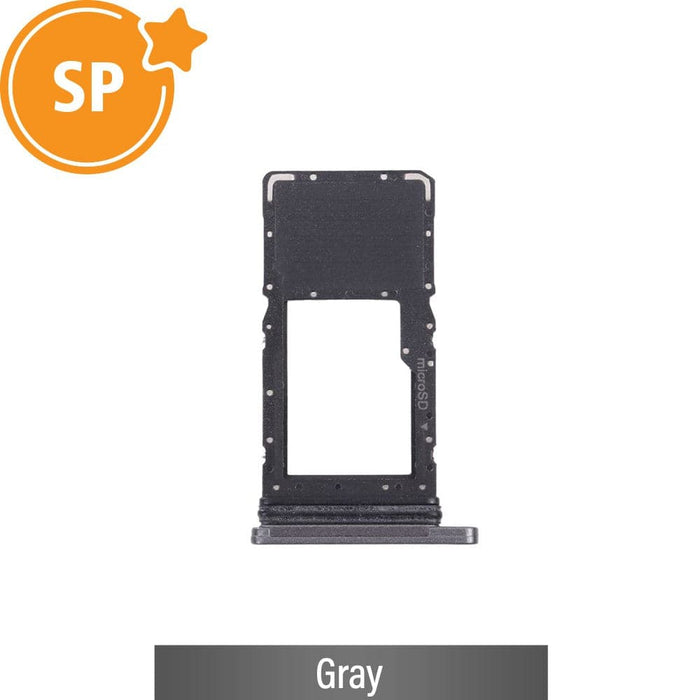
    Samsung Galaxy Tab A7 Lite SD Card Tray T220 Wi-Fi GH81-20674A Gray Service Pack

    Original price $0.00 - Original price $0.00
    Original price $0.00
    $9.45
    $9.45 - $9.45
    Current price $9.45
    SKU NEWSTray-T220-GRY
    Genuine Samsung Service Pack — Brand New

    MicroSD Card Tray — Samsung Galaxy Tab A7 Lite Wi-Fi (T220) — Gray

    Genuine Samsung Service Pack part GH81-20674A. MicroSD storage tray for the Wi-Fi-only SM-T220 model.

    SM-T220 Wi-Fi Only Part No. GH81-20674A MicroSD Only — No SIM Slot In Stock — Ships 2-4 Business Days

    ⚠ Wi-Fi Model — MicroSD Only

    The SM-T220 is a Wi-Fi-only tablet. It has no cellular radio and no SIM card capability. The tray (GH81-20674A) holds a MicroSD storage card only. There is no SIM slot on this tray.

    If you have the SM-T225 LTE, you need part GH81-20673A. That tray has Dual SIM + MicroSD slots. It is a separate listing.

    Is your Tab A7 Lite T220 showing these problems?

    A damaged or missing SD card tray causes these common storage issues.

    ❌ MicroSD card not detected by the tablet
    ❌ Tray is bent, cracked, or missing entirely
    ❌ SD card keeps ejecting or not seating properly
    ❌ Tray does not click into place securely
    ❌ Tray colour does not match the Gray tablet body
    ❌ Storage expansion no longer working on the tablet

    This genuine Samsung replacement tray is the direct fix for all of these.

    Genuine Samsung Service Pack Quality

    ✅ Samsung Service Pack

    GH81-20674A is a genuine Samsung replacement part. Same factory specification as the original tray on your SM-T220.

    ✅ MicroSD Storage Tray

    Holds a single MicroSD card. Expands tablet storage by up to 1 TB. Designed for the Wi-Fi T220 chassis slot.

    ✅ Exact Colour Match

    Gray finish matches the Gray SM-T220 body. Keeps your tablet looking clean and factory-original after replacement.

    ✅ Brand New Condition

    This is a new part, not pulled or refurbished. Every tray is tested for correct fit before dispatch.

    ✅ Precise Fit — No Modification

    Slides directly into the T220 tray slot without trimming or force. Clicks in with the original locking feel.

    ✅ Parts-Only Purchase

    This is the part only. Need the repair done for you? Call JPC Mobile on 0480 039 913 before ordering.

    🏫

    Brisbane Technical Hub

    Located at 152 Woogaroo St, Forest Lake QLD 4078. Call 0480 039 913 for Samsung tablet part advice.

    🔍

    Authenticity Guaranteed

    Genuine Samsung Service Pack part GH81-20674A. Tested and dispatched from our Forest Lake store.

    📦

    Reliable Dispatch

    Ships within 2-4 business days via Australia Post. Australia-wide delivery to every state and territory.

    Part Specifications

    Part Type MicroSD Card Tray — no SIM slot
    Samsung Part Number GH81-20674A (Samsung Service Pack)
    Card Slots 1x MicroSD only (no SIM slot — Wi-Fi model)
    MicroSD Capacity Up to 1 TB MicroSD supported
    Colour Gray — matches SM-T220 Gray body
    Silver Variant Part GH81-20676A — see our separate Silver listing
    Condition Brand new — genuine Samsung Service Pack
    Eject Method SIM eject tool or paperclip into side port
    Package Contents 1x MicroSD card tray
    Dispatch 2-4 business days — Australia-wide via Australia Post
    Warranty JPC Quality Tested — does not carry a manufacturer warranty

    Compatibility — Read Before Ordering

    ✅ Compatible Models

    • Samsung Galaxy Tab A7 Lite (Wi-Fi) — SM-T220
    • Gray colour variant of the SM-T220 only

    ❌ Not Compatible / Different Part

    • SM-T225 LTE — needs GH81-20673A (SIM + SD tray)
    • SM-T220 Silver — needs GH81-20676A (Silver tray)
    • SM-T225N (Korea LTE) — different tray
    • SM-T227U (US carrier) — different part

    ⚠ Check the model number printed on the back of your tablet before ordering. The T220 and T225 look nearly identical but use different trays.

    How to Remove the SD Card Tray

    1

    Locate the Eject Port

    Find the small hole on the side of the tablet. It sits next to the tray slot on the SM-T220 frame.

    2

    Eject the Tray

    Insert a SIM eject pin or a straightened paperclip into the hole. Push gently until the tray pops out.

    3

    Swap the Tray

    Remove the old tray and place your MicroSD card into the new one. Insert it back until it clicks securely.

    4

    Confirm Detection

    Power on the tablet. Go to Settings to confirm the MicroSD card is detected and available for use.

    Frequently Asked Questions

    Why does the T220 tray have no SIM slot? +

    The SM-T220 is a Wi-Fi-only tablet. It has no cellular radio inside the device. The tray has no SIM slot. There is no SIM hardware in the T220. Only the MicroSD slot is active.

    If you need a tablet with SIM capability, that would be the SM-T225 LTE model. It uses a different tray (GH81-20673A) with two Nano-SIM slots.

    How do I know if I have the T220 or T225? +

    The model number is printed in small text on the back of the tablet. You can also check Settings → General Management → About Tablet for the model number.

    The easiest check: a tablet with a SIM card slot is the T225 LTE. If the tray only holds an SD card, it is the T220 Wi-Fi.

    Will this tray fit the SM-T225 LTE? +

    The physical chassis is similar, but the T225 requires a different tray. The T225 tray has Dual SIM slots plus MicroSD — that is part GH81-20673A.

    If you install the T220 tray in a T225, you lose SIM card functionality. Always match the part number to your exact model.

    Do I need to open the tablet to replace the tray? +

    No. The tray is external. Use a SIM eject pin or paperclip to pop it out from the side port. No disassembly or tools are needed.

    The tray slides out from the side of the tablet. It clicks back in once your MicroSD card is placed.

    What is a Samsung Service Pack part? +

    Samsung Service Pack parts are genuine replacement components made by Samsung for the repair market. They carry official Samsung part numbers and meet factory quality standards.

    GH81-20674A is the official Samsung part number for this tray. It is not an aftermarket or third-party copy.

    I have a Silver T220 — will this Gray tray fit? +

    The tray will fit mechanically — the chassis slot is the same across both colours. However, the Gray tray will not match a Silver body cosmetically.

    The Silver T220 tray is part GH81-20676A. We stock this separately. Call us on 0480 039 913 or visit 152 Woogaroo St, Forest Lake QLD 4078.

    Can JPC Mobile install this for me? +

    This listing is the part only. If you need the repair carried out, contact us before purchasing.

    Call 0480 039 913 or visit 152 Woogaroo St, Forest Lake QLD 4078. We can advise on your specific situation.

    Is there a warranty on this part? +

    This part does not carry a manufacturer warranty. Every tray is quality tested before dispatch to confirm it is free from defects.

    For order concerns, call us on 0480 039 913. You can also visit 152 Woogaroo St, Forest Lake QLD 4078.

    How long does delivery take? +

    Orders are dispatched within 2-4 business days via Australia Post. Delivery times vary by state. Most orders arrive within 2 to 7 business days after dispatch.

    We ship Australia-wide to all states and territories. This includes QLD, NSW, VIC, WA, SA, TAS, ACT, and NT.

    About JPC Mobile Accessories

    🏫

    Our Location

    152 Woogaroo St
    Forest Lake QLD 4078
    Brisbane, Australia

    📞

    Contact Us

    Phone: 0480 039 913
    Forest Lake, Brisbane QLD
    Samsung tablet part enquiries welcome

    🚚

    Shipping

    Australia-wide via Australia Post
    Dispatch: 2-4 business days
    All states and territories

    JPC MOBILE ACCESSORIES

    152 Woogaroo St, Forest Lake QLD 4078 | Phone: 0480 039 913

    Brisbane's Samsung tablet parts specialists — shipping Australia-wide

    JPC Quality Tested
    Genuine Samsung Service Pack
    Ships Australia-Wide
    2-4 Business Day Dispatch

    Payment Options

    We offer multiple convenient payment options for your repairs and accessories purchases. Pay with cash, debit/credit card, or interest-free Buy Now Pay Later options.

    Afterpay Zip Klarna PayPal
    Learn more about our Buy Now, Pay Later options →

    Shipping & Processing Information

    Processing Time

    All orders require 2-4 business days for processing, regardless of shipping method.

    This includes order verification, picking, packing and preparation for dispatch.

    You will receive tracking information for all shipped orders and notification when pickup orders are ready for collection.

    Shipping Methods

    Standard: 3-7 business days in transit after processing

    Express: 1-2 business days in transit after processing

    Express shipping only affects delivery time once dispatched, not processing time.

    Express shipping does not expedite the 2-4 business day processing time.

    Samsung Galaxy Tab A7 Lite SD Card Tray T220 Wi-Fi GH81-20674A Gray Service Pack Speakers JPC MOBILE ACCESSORIES

    Samsung Galaxy Tab A7 Lite SD Card Tray T220 Wi-Fi GH81-20674A Gray Service Pack

    $9.45