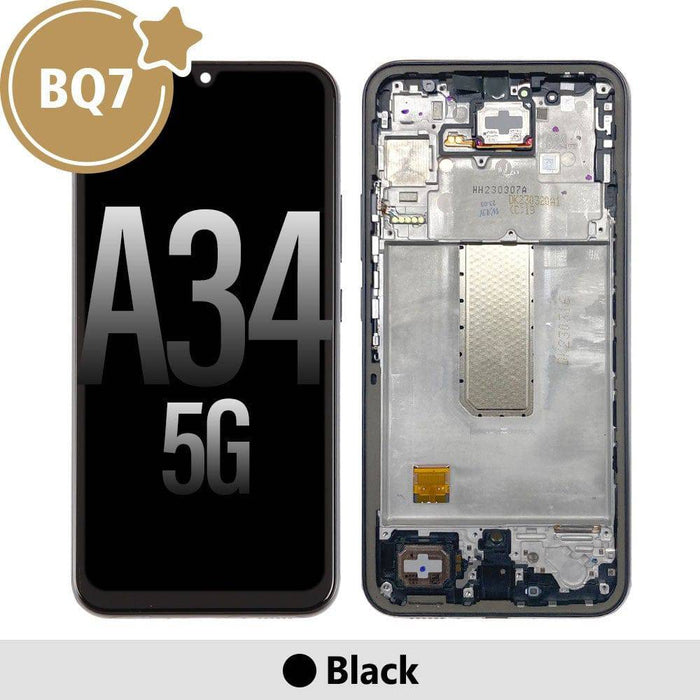
✅ Compatibility
Device: Samsung Galaxy A34 5G (2023)
Model Numbers: SM-A346B, SM-A346B/DS, SM-A346B/DSN, SM-A346E, SM-A346E/DS, SM-A346E/DSN, SM-A346M, SM-A346M/N, SM-A346M/DSN, SM-A3460
Verify your model: Settings → About Phone → Model Number
Frequently Asked Questions
What is the difference between BQ7 and Samsung service pack screens?+
BQ7 screens are high-quality aftermarket displays manufactured to match Samsung service pack specifications. The primary difference is that Samsung service pack screens are official Samsung parts with Samsung branding and come directly from Samsung's supply chain, while BQ7 screens are made by third-party manufacturers to the same specifications. In terms of visual quality, colour reproduction, brightness, and touch sensitivity, BQ7 screens perform identically to service pack screens. Both use OLED technology with the same resolution and refresh rate. The advantage of BQ7 is the lower price point, making screen repair more affordable for customers and more profitable for repair businesses. Professional technicians often cannot tell the difference once installed, and customers receive the same excellent viewing experience. We test every BQ7 screen before shipping to ensure it meets our quality standards. The 12-month warranty we provide gives you confidence that you're receiving a reliable product that will perform well for the long term.
Does this screen include the frame or is it glass only?+
This Samsung Galaxy A34 5G screen assembly comes with the frame included. The frame is the metal or plastic housing that surrounds the display and provides mounting points for the screen to attach to the phone chassis. Having the frame included makes installation significantly easier and produces better results. Without a frame, you would need to carefully transfer the old frame from your damaged screen, which is a delicate process that can result in bent or damaged frames affecting the final fit. With the frame included, the installation process is more straightforward as you simply transfer your internal components like the motherboard, battery, cameras, and speakers to the new assembly. The frame ensures proper alignment of all components and provides a factory-like finish once complete. For professional technicians, frame-included screens save significant time during repairs. For DIY repairers, they reduce the risk of damaging components during the frame transfer process. The black frame colour is designed to match Samsung Galaxy A34 5G devices with black housings.
Will the fingerprint sensor work with this replacement screen?+
Yes, the under-display fingerprint sensor will work with this BQ7 OLED screen replacement. The Samsung Galaxy A34 5G uses an optical fingerprint sensor that sits beneath the display. This sensor is a separate component from the screen itself and remains attached to your phone's motherboard. When you install the new screen, the optical sensor reads fingerprints through the OLED display just as it did with the original screen. The high transparency of the OLED panel allows the sensor to function correctly. After installation, we recommend re-registering your fingerprints in Settings for optimal recognition. Go to Settings, then Biometrics and Security, then Fingerprints. Delete your existing fingerprint data and register your fingers again with the new screen installed. This recalibration ensures the sensor works optimally through the new display. Some users report slight sensitivity differences compared to original Samsung screens, but the vast majority find fingerprint recognition works just as well. If you experience any issues, adjusting your finger placement or registering the same finger multiple times can help improve recognition.
What tools do I need to install this screen?+
Installing a Samsung Galaxy A34 5G screen requires several specialised tools that professional technicians typically have in their toolkit. You will need a heat gun or hot air station to soften the adhesive holding the back cover and existing screen. Suction cups help lift the back cover and screen once the adhesive is softened. Plastic pry tools and opening picks are essential for separating components without scratching or damaging the frame. A precision screwdriver set with Phillips and Torx heads is needed for removing internal screws. Tweezers help with handling small components and flex cables. Isopropyl alcohol helps clean adhesive residue before installing the new screen. Fresh adhesive strips or B-7000 glue are needed to secure the new screen in place. An anti-static wrist strap protects sensitive components from electrostatic discharge. For testing, you may want a phone power supply to test the screen before final assembly. We highly recommend watching detailed repair videos specific to the Samsung Galaxy A34 5G before attempting this repair if you are not an experienced technician, as the process has several points where damage can occur if not done carefully.
How do I test the screen before completing installation?+
Testing the screen before final installation is a critical step that can save significant time and frustration. Once you have connected the new screen's flex cables to the motherboard but before applying any adhesive, you should power on the device to verify functionality. Start by checking that the display turns on and shows a clear image without any dead pixels, lines, or discolouration. Look carefully across the entire screen for any defects. Next, test the touch functionality by navigating through menus and typing on the keyboard, checking that touch response works correctly across all areas of the screen. Open the Settings app and navigate to Display settings to verify brightness adjustment works from minimum to maximum. Test the fingerprint sensor if possible by attempting to unlock with a registered fingerprint. Check the proximity sensor by placing your hand over the top of the phone during a call or using a sensor test app. If everything functions correctly, you can proceed to disconnect the screen, apply adhesive, and complete final assembly. If you notice any issues, contact us before completing installation as warranty claims are easier to process on screens that have not been fully installed.
What does the 12-month warranty cover?+
Our 12-month warranty covers manufacturing defects in the OLED screen assembly. This includes dead pixels that appear without physical damage, backlight failures, touch digitizer malfunctions, display discolouration, and any issues with the screen that arise from manufacturing faults rather than installation errors or physical damage. If your screen develops any of these issues during normal use within twelve months of purchase, we will replace it at no cost. The warranty process requires you to contact us with your order number and a description of the issue. We may ask for photos or videos showing the defect. For straightforward warranty claims, we will ship a replacement screen promptly. The warranty does not cover physical damage such as cracks, scratches, or impact damage that occurs after installation. It also does not cover damage caused by improper installation, liquid damage, or use of the phone beyond normal conditions. Screens that have been modified or used with non-compatible devices are also not covered. We recommend professional installation to avoid any installation-related issues that might void warranty coverage. Keep your purchase confirmation as proof of purchase for warranty claims.
Is this screen OLED or LCD and why does it matter?+
This is an OLED screen, which matches the original Samsung Galaxy A34 5G display technology. OLED stands for Organic Light-Emitting Diode, and it differs significantly from LCD technology in how it produces images. In an OLED display, each pixel produces its own light, meaning individual pixels can be completely turned off to produce true black. This results in infinite contrast ratios, deeper blacks, and more vibrant colours compared to LCD screens that use a backlight. The Samsung Galaxy A34 5G specifically uses a Super AMOLED display, which is Samsung's marketing name for their OLED technology with additional features. LCD replacement screens for OLED phones exist and are typically cheaper, but they produce noticeably inferior image quality. Colours appear washed out, blacks look grey, and the overall viewing experience is degraded. Battery life can also be affected because LCDs require constant backlighting while OLED only lights active pixels. We only stock OLED replacements for the Galaxy A34 5G because we believe maintaining the original display quality is important for customer satisfaction. When you install this screen, you get the same vibrant viewing experience as the original Samsung display.
Can I install this screen myself or should I use a professional?+
We highly recommend professional installation for Samsung Galaxy A34 5G screen replacements. This repair is rated as difficult to very difficult on most repair guides. The process requires opening the phone from the back, which involves heating and carefully prying adhesive-sealed components. Internal flex cables are delicate and can be damaged by inexperienced handling. The battery must be disconnected before working near the motherboard to prevent short circuits. Multiple screws and brackets must be removed and reinstalled in the correct positions. Adhesive must be properly cleaned and reapplied to ensure the phone remains dust and water resistant. For experienced DIY repairers who have successfully completed similar phone repairs before, this is achievable with patience, proper tools, and careful attention to repair guides. However, for first-time repairers or those without proper tools, the risk of causing additional damage often outweighs the cost savings of DIY repair. A professional technician can typically complete this repair in thirty to sixty minutes with proper tools and experience. We sell this screen to both professional repair shops and confident DIY repairers, but we always recommend honest assessment of your skill level before attempting complex phone repairs.
Will this screen support the 120Hz refresh rate?+
Yes, this BQ7 OLED screen fully supports the Samsung Galaxy A34 5G's 120Hz refresh rate capability. The 120Hz refresh rate means the display updates one hundred and twenty times per second, compared to the standard sixty Hz found on older phones. This higher refresh rate results in smoother scrolling, more responsive touch interaction, and better-looking animations throughout the interface. When you install this screen, the phone will automatically recognise its capabilities and allow you to enable 120Hz in Settings under Display and Motion Smoothness. You can choose between Standard sixty Hz for maximum battery life or High one hundred twenty Hz for the smoothest experience. Some users prefer the Adaptive setting that switches between refresh rates based on content. The screen's response time and panel quality are designed to handle the faster refresh rate without ghosting or motion blur. Games and apps that support high refresh rates will run smoothly on this display. The 120Hz capability is one of the features that makes the Galaxy A34 5G feel premium, and this replacement screen ensures you keep that experience after repair.
How do I check my Samsung Galaxy A34 5G model number before ordering?+
Checking your model number before ordering is essential to ensure you receive the correct screen for your device. There are several ways to find your Samsung Galaxy A34 5G model number. The easiest method is through your phone's settings if the screen is still partially working. Go to Settings, scroll down to About Phone, and look for Model Number. It will show something like SM-A346B or SM-A346E followed by additional letters indicating specific variants. If your screen is completely non-functional, you can find the model number on the original box your phone came in. Look for a sticker with barcodes and product information. The model number is usually printed near the IMEI numbers. Another option is to check your purchase receipt or order confirmation email from when you bought the phone. You can also remove the SIM tray and look for printed information on the tray or inside the SIM slot area on some models. Finally, the model number may be printed on the phone's frame near the SIM slot or on a sticker under the back cover if your phone has a removable back. This screen is compatible with all SM-A346 variants including the B, E, M, and numeric suffixes commonly sold in Australia.