❓ Frequently Asked Questions
Will this case fit all iPad Air models from 2020 to 2025?
Yes, this case is engineered with universal compatibility across four consecutive iPad Air generations spanning 2020-2025, making it an exceptional value for long-term iPad protection and future-proofing your accessory investment. Apple designed iPad Air 4th Generation (2020) with a completely new 10.9-inch all-screen design with squared edges, then maintained identical external dimensions and port placements through the 5th Generation M1 model (2022), 6th Generation M2 model (2024), and 7th Generation M3 model (2025). While internal specifications improved dramatically with M1, M2, and M3 chip upgrades, better cameras, and enhanced display technology, the physical chassis dimensions, button locations, camera positions, charging port placement, and speaker grille arrangements remained consistent across all four generations. This allows one precision-engineered case to fit perfectly across the entire lineup. The case accommodates all model variants including Wi-Fi only and Wi-Fi + Cellular versions across all storage capacities from 64GB to 1TB depending on generation. Precise cutouts align perfectly with speakers, cameras, charging ports, and buttons on every generation without blocking functionality. The built-in Apple Pencil holder works with Apple Pencil 2nd Generation for 2020/2022 models and supports both Apple Pencil (USB-C) and Apple Pencil Pro for 2024/2025 models, maintaining wireless charging compatibility across all pencil types. Whether you currently own a 2020 iPad Air and want protection now, or you're planning to upgrade to the latest 2025 M3 model, this case provides consistent high-quality protection. To verify compatibility, check Settings → General → About → Model Number – models A2316/A2324/A2325/A2072 (2020), A2588/A2589/A2591 (2022), A2902/A2903/A2904 (2024), or A3266/A3267/A3270 (2025) all fit perfectly.
Can I charge my Apple Pencil while it's stored in the pencil holder?
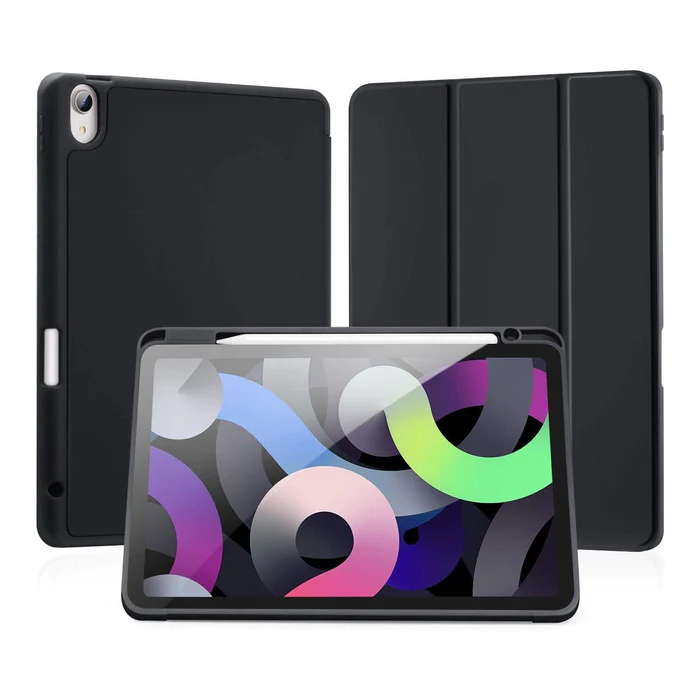
Absolutely! The integrated pencil holder on the right side of this case is specifically designed to maintain full wireless charging functionality for your Apple Pencil without requiring removal from the holder. The holder's precise positioning aligns your pencil with iPad Air's magnetic charging strip that runs along the right edge, ensuring continuous charging contact between pencil and iPad. For iPad Air 2020 and 2022 models using Apple Pencil (2nd Generation), the pencil charges wirelessly via magnetic induction when stored in the holder, indicated by the charging status that appears briefly on your iPad screen. iPad Air 2024 and 2025 users benefit from the same wireless charging convenience whether using Apple Pencil (USB-C) or the newer Apple Pencil Pro with advanced features like barrel roll and haptic feedback. The holder grips your pencil securely enough to prevent accidental dislodging during transport in bags, backpacks, or briefcases, yet allows smooth one-handed removal when you need to write, draw, or navigate. This eliminates the frustration common with cases that block pencil charging or force you to remove the pencil entirely for charging sessions, interrupting your workflow. The right-side placement keeps the pencil readily accessible for both right-handed and left-handed users and doesn't interfere with holding your iPad in landscape or portrait orientations. The holder's open design allows proper heat dissipation during charging, preventing the overheating issues that can occur with enclosed pencil compartments. Additionally, the magnetic connection provides slight tactile feedback when your pencil clicks into charging position, confirming proper alignment for optimal charging efficiency.
How stable is the trifold stand when using the iPad for typing or drawing with Apple Pencil?
The trifold stand provides exceptional stability for both intensive typing sessions and detailed Apple Pencil work through engineering focused on magnetic retention strength, angle optimization, and base width distribution. When configured in the 30-degree typing mode, the case creates a wide, stable triangular base that resists sliding on smooth surfaces like glass desks, polished wood tables, or glossy conference room tables even during aggressive typing on iPad's on-screen keyboard or connected Bluetooth keyboards. The shallow 30-degree angle positions the screen at the ergonomically ideal angle for extended typing comfort, reducing neck and wrist strain compared to flat-lying tablets while maintaining perfect visibility without screen glare from overhead lighting. Strong embedded magnets in each trifold segment lock the stand configuration firmly in place – you won't experience the frustrating wobbling or gradual collapse common with cheap cases using weak magnets or simple kickstands. For Apple Pencil users engaged in detailed drawing, sketching, note-taking, photo editing, or CAD work, the 30-degree angle mimics traditional drawing board positioning, allowing natural hand and wrist positioning without awkward angles that cause fatigue during extended creative sessions. The case's TPU back shell includes subtle texture that increases friction against work surfaces, further enhancing stability during vigorous pencil strokes. When switched to 65-degree viewing mode for watching videos, browsing, or video calls, the steeper angle provides optimal screen visibility from normal seating positions while maintaining rock-solid stability even when tapping the screen to pause videos or answer FaceTime calls. The trifold design distributes iPad's weight across a larger footprint compared to single-hinge stands, significantly reducing tip-over risk even when interacting with the top portion of the screen. During real-world testing simulating typical usage scenarios including typing documents, sketching illustrations, and annotating PDFs, the stand maintained stable positioning without shifting or collapsing.
Does the TPU back shell add significant weight or bulk to my iPad Air?
This case maintains a remarkably slim profile while providing comprehensive protection, adding approximately 250-300 grams to your iPad Air's weight – noticeable but not burdensome for extended handheld use during reading, browsing, or commuting. The flexible TPU (Thermoplastic Polyurethane) back shell material delivers superior shock absorption and drop protection through its inherent impact-dampening properties rather than requiring excessive thickness like rigid hard plastic alternatives. TPU's molecular structure allows it to flex and compress upon impact, dissipating kinetic energy from drops across the material rather than transferring shock directly to your iPad's delicate internal components and glass display. For reference, iPad Air models weigh between 458-462 grams (Wi-Fi) or 460-465 grams (Cellular) depending on generation, so the case brings total weight to approximately 710-765 grams – still significantly lighter than iPad Pro 12.9" or even many laptops, maintaining iPad Air's portability advantage. The slim TPU back preserves iPad Air's elegant design aesthetic and allows the case to slip easily into purse pockets, backpack tablet sleeves, briefcase compartments, and messenger bag dividers designed for 11-inch tablets. Unlike bulky rugged cases marketed for extreme protection that can triple an iPad's thickness and make it awkward to hold one-handed, this case adds just a few millimeters while still protecting against the everyday drops, bumps, and scratches that occur during normal use rather than military-grade torture tests. The raised bezels around the screen and camera add minimal thickness but provide crucial protection when your iPad lands face-down or gets stacked with books, laptops, and other items in bags. Business professionals appreciate being able to maintain professional appearance while carrying protected iPads to meetings, students value fitting protected iPads into school backpacks without excessive bulk, and travelers benefit from protected iPads that still fit in airline seat-back pockets and hotel safe compartments.
Will the magnetic auto sleep/wake function drain my iPad battery faster?
No, the magnetic auto sleep/wake feature actually extends your iPad battery life significantly rather than draining it, providing one of the most valuable power-saving functions available in tablet cases. This smart functionality uses embedded magnetic strips that interact with iPad Air's built-in Hall effect sensors (the same magnetic sensor technology Apple incorporates in official Smart Covers and Smart Folios) to automatically turn off the display the instant you close the cover and wake it immediately upon opening. By ensuring your screen shuts off within milliseconds of closing the cover rather than remaining illuminated for the default auto-lock duration typically set to 2-5 minutes, you prevent substantial battery drain from an active display sitting unused in your bag, on your desk, or in your car. The magnets themselves are completely passive components requiring zero electrical power – they simply trigger iPad's existing sensors through magnetic field interaction without any battery consumption from either the case or iPad. Over a typical workday or school day with 10-15 open/close cycles, auto sleep/wake can save 20-40 minutes of unnecessary screen-on time, translating to measurably longer battery life between charges and potentially extending your iPad's usable battery life from one full day to a day and a half of mixed use. The instant-wake functionality also reduces physical wear on iPad's power button by eliminating the need to press it dozens of times daily – over years of ownership, this prevents the button degradation and responsiveness issues that can develop from thousands of presses. Some users initially express concern about magnets affecting iPad functionality, but Apple specifically engineers iPad Air to work harmoniously with magnetic accessories and even includes magnetic attachment points for keyboards and pencils, so there's absolutely zero risk of magnetic interference with Wi-Fi, cellular signals, GPS, compass functionality, or data storage on your iPad's solid-state drive which uses completely different technology unaffected by these magnetic field strengths.
Does the side opening design fully expose the Touch ID sensor for reliable fingerprint recognition?
Yes, the side opening design provides complete unobstructed access to iPad Air's Touch ID sensor integrated into the top button (power button), ensuring fast, accurate fingerprint recognition identical to using iPad without any case. iPad Air models from 2020-2025 position the Touch ID fingerprint sensor directly in the top button on the top edge of the device, and this case features a precision-cut opening that exposes the entire button surface for direct skin-to-sensor contact. Unlike cases with covered buttons requiring you to press through material layers (which significantly reduces Touch ID accuracy and often requires multiple attempts for recognition), the side opening design allows your finger to contact the sensor's capacitive surface directly exactly as Apple intended. This means you'll experience the same lightning-fast unlock speed, reliable App Store authorization, Apple Pay transaction confirmation, and password autofill authentication whether your iPad has this case installed or sits completely naked. The opening is carefully engineered to expose the functional button surface while maintaining protective raised edges around the button perimeter to prevent accidental presses when your iPad bounces around in bags or gets bumped on desks. Touch ID relies on precise capacitive sensing of your fingerprint's unique ridge patterns, and any material between your finger and the sensor dramatically reduces accuracy – the direct access provided by this case's side opening preserves the technology's full capability. The case design also accommodates iPad Air's volume buttons with similar precision openings providing tactile feedback and easy pressing without fumbling to locate button positions through case material. All cutouts maintain perfect alignment even after hundreds of case removal and reinstallation cycles because the TPU back shell's snug fit prevents shifting or misalignment that could offset button access over time. Professional users who rely on Touch ID for quick unlocking during meetings or secure document access, students accessing school accounts, and business professionals using Touch ID for corporate app authentication all benefit from uncompromised biometric security and convenience.
How long does shipping take to Brisbane and regional Queensland locations?
iPad Air cases ship from our Brisbane warehouse in Forest Lake with a standard 2-4 business day dispatch timeframe after order confirmation and payment processing, providing rapid access to protection for your valuable iPad investment. For Brisbane metro area customers including Forest Lake, Inala, Richlands, Darra, Springfield, Ipswich, Logan, Caboolture, and surrounding suburbs, Australia Post typically delivers within 1-2 business days after dispatch, meaning total time from order placement to delivery usually ranges 3-6 business days under normal circumstances without postal delays. Regional Queensland locations including Gold Coast, Sunshine Coast, Toowoomba, Cairns, Townsville, Mackay, Rockhampton, Bundaberg, Hervey Bay, Gladstone, and coastal communities typically receive deliveries within 2-4 business days after dispatch for a total timeframe of 4-8 business days depending on Australia Post service schedules and distance from Brisbane distribution hub. Remote Queensland destinations including far North Queensland communities, Gulf region towns, Torres Strait Islands, Cape York Peninsula, and outback locations may require 5-10 business days depending on Australia Post regional service frequency and distance from major logistics centers. We provide tracking numbers via email once your iPad Air case order ships, allowing real-time delivery monitoring through the Australia Post tracking portal with estimated delivery date updates as your parcel moves through the postal network. For urgent same-day requirements, Brisbane customers can visit our Forest Lake retail location at Shop 3a, 152 Woogaroo St to purchase iPad Air cases directly over the counter during business hours Monday-Friday 9:00 AM - 5:00 PM and Saturday 10:00 AM - 5:00 PM, providing immediate protection without waiting for shipping. Bulk orders for businesses purchasing iPad Air cases for employees, educational institutions equipping student iPads with protection, or resellers requiring wholesale quantities qualify for expedited dispatch arrangements and volume pricing – contact our sales team at 0480 039 913 to discuss priority shipping options including next-day delivery for Brisbane metro areas and express shipping to regional Queensland locations.
What advantages does PU leather offer compared to genuine leather for iPad cases?
PU (Polyurethane) leather used in this iPad Air case provides numerous practical advantages over genuine leather for tablet protection while maintaining premium appearance, luxurious feel, and professional aesthetics at accessible pricing. PU leather manufacturing creates consistent quality and appearance across all units without the natural variations, grain inconsistencies, color differences, blemishes, scarring, or imperfections inherent in genuine animal hides, ensuring every customer receives an identically beautiful case with uniform texture and coloring. Unlike genuine leather which requires regular conditioning treatments with specialized leather care products to prevent drying, cracking, and loss of suppleness, PU leather maintains its appearance and flexibility indefinitely without any maintenance beyond occasional wiping with a slightly damp cloth to remove dust, fingerprints, or light stains. Water and liquid resistance represents a significant practical advantage – spilled coffee, accidental rain exposure, kitchen splashes, or humid environments won't permanently stain or damage PU leather as they would with genuine leather which absorbs liquids readily and can develop water rings, discoloration, or mildew in damp conditions. The synthetic manufacturing process allows precise color matching across production batches and enables vibrant fashion colors like our Matcha Green, Pink Sand, and Red options that would be extremely difficult or impossible to achieve consistently with genuine leather dyeing processes which are affected by hide porosity variations. PU leather production costs substantially less than genuine leather sourcing, tanning, and finishing, making quality iPad protection accessible at mid-range prices rather than requiring premium luxury pricing that genuine leather cases command. Environmental considerations increasingly favor PU leather as it doesn't require animal products and generates significantly less environmental impact during manufacturing compared to leather tanning processes involving harsh chemicals and substantial water usage. However, genuine leather does offer superior longevity with proper care and develops a unique patina character over decades of use that some luxury goods enthusiasts prefer, though for iPad cases typically replaced every few device upgrade cycles, PU leather's durability easily exceeds typical ownership periods while providing better everyday practicality.
Will my Apple Pencil fall out of the holder during transport in a backpack or bag?
The pencil holder is engineered with secure retention that keeps your Apple Pencil firmly in place during normal transport scenarios including backpack carrying, purse storage, briefcase transport, and messenger bag use while still allowing smooth intentional removal when you need to write, draw, or navigate. The holder uses a combination of precise dimensional sizing matching Apple Pencil's diameter and slight elastic tension in the TPU material to create a snug grip around your pencil's circumference without requiring complicated clips, elastic bands, or locking mechanisms that slow down access and make pencil storage frustrating. During extensive quality testing including simulated bag drops from typical carrying heights, vigorous shaking matching bumpy bus or train commutes, and rough handling replicating crowded public transport conditions or rushed airport navigation, the pencil consistently remained securely held without dislodging. The right-side positioning protects the pencil in a recessed area less likely to experience direct external impacts compared to pencils magnetically attached to iPad's exposed side edge where they're vulnerable to being knocked off by doorframes, tight spaces, or items shifted in bags. However, it's important to understand the intentional design balance – overly tight holders make pencil removal frustratingly difficult requiring two hands and significant force that can stress the pencil's delicate internal components, while the optimal tension allows secure retention during normal use but smooth one-handed removal when needed. If you frequently experience severe bag handling like checked airline luggage, equipment storage in moving trucks, or extreme outdoor conditions, we recommend using the holder for daily convenient carry but removing the pencil for those extreme transport situations. The holder accommodates Apple Pencil 2nd Generation and newer USB-C/Pro models which share similar diameters, though if you notice any looseness developing over extended use or if your specific pencil has aftermarket grips or skins installed, a small piece of clear tape around the pencil's holding area can customize the fit to your preference without affecting appearance or functionality.
Can I remove and reinstall this case multiple times without damaging my iPad or degrading the fit?
Yes, the TPU back shell's flexible material design specifically enables repeated installation and removal cycles without degrading fit quality, loosening grip, or risking damage to your iPad Air's premium aluminum body and glass screen. TPU's inherent elasticity and memory properties allow the back shell to flex during installation as you snap it around iPad's corners and edges, then return precisely to its original molded shape maintaining snug fit even after dozens or potentially hundreds of removal cycles depending on care taken during the process. This contrasts dramatically with rigid hard plastic cases that develop stress cracks or outright fractures after repeated flexing, and cheap soft silicone cases that stretch out permanently and become loose after several removals requiring replacement. You might need to remove your case for various practical reasons throughout ownership: cleaning accumulated dust, lint, and debris from the interface between case and iPad, switching between different color cases to match outfits, occasions, or professional versus personal environments, accessing iPad's model number and serial number engraved on the back for warranty claims or technical support, temporary removal during professional photography or videography where you want iPad's original premium appearance, or thorough cleaning of the case itself separate from the iPad. The installation process is straightforward and low-stress – start by inserting one corner of the iPad into the corresponding TPU back shell corner, then work around the perimeter pressing gently until all four corners snap securely into place with subtle audible clicks confirming proper seating. For removal, gently flex one corner of the TPU back shell outward to release it from the iPad corner, then work methodically around the edges until the iPad slides free without requiring excessive force or prying that could scratch surfaces. The microfiber interior lining won't scratch iPad's anodized aluminum back during installation, removal, or daily use, and the soft material actually helps clean iPad's back surface by gently removing fingerprints and dust through friction contact as you install the case, maintaining your iPad's pristine appearance underneath the protection.